OpenSend
Open-source email infrastructure for developers.
Send transactional emails, manage domains, build broadcasts — all self-hosted.


Deploy · Features · API · Self-Hosting · Contributing
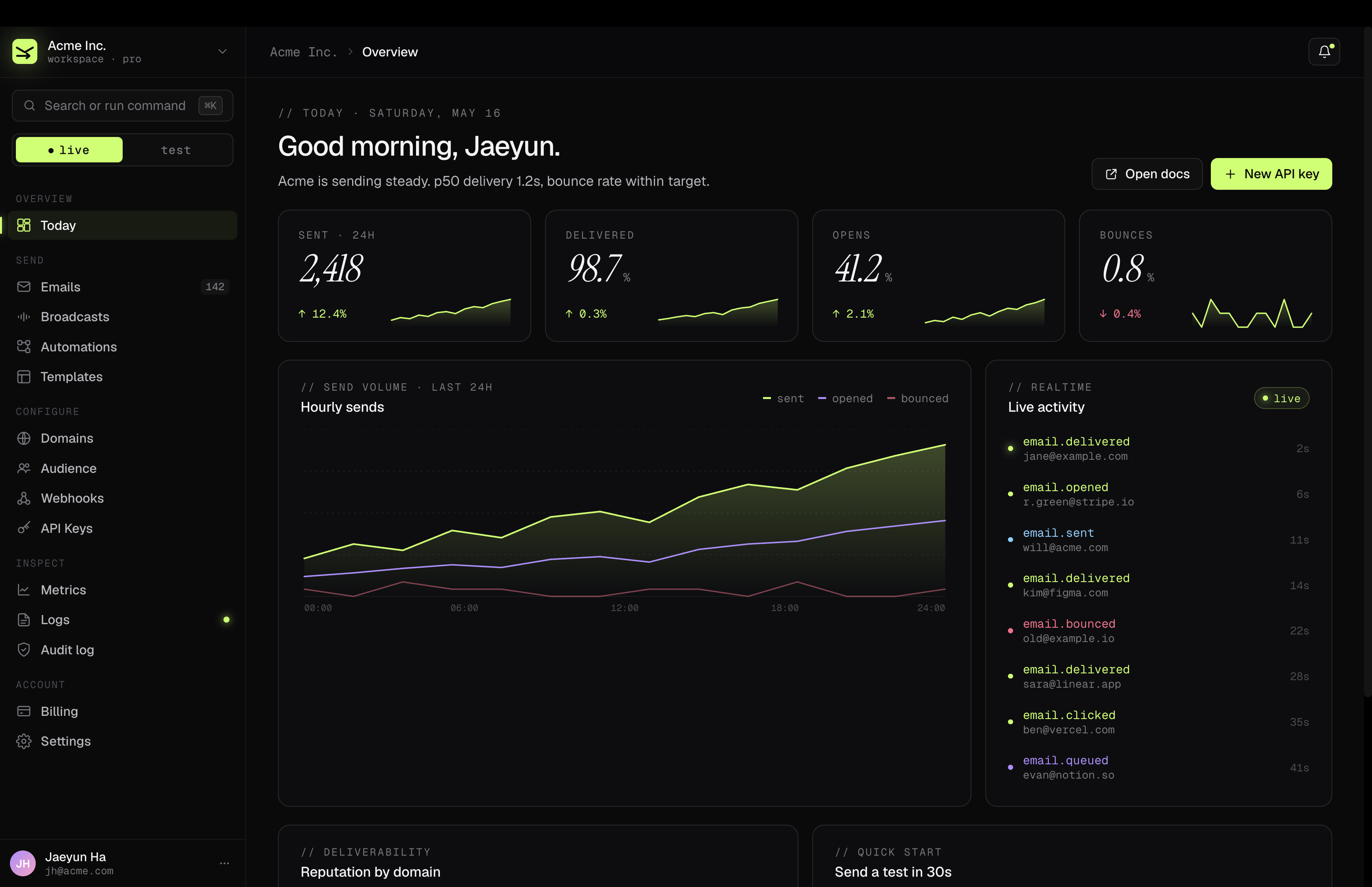
What is Opensend?
Opensend is a self-hostable email platform that gives you the same developer experience as Resend — REST API, TypeScript SDK, React email templates, domain verification, webhooks, and a full dashboard — running on your own infrastructure.
Use it if you want:
- Full control over your email infrastructure
- No per-email pricing — send as much as your SES quota allows
- A drop-in Resend-compatible API for your existing code
- An admin dashboard for domains, templates, broadcasts, and analytics
One-Click Deploy
The fastest way to get Opensend running:
git clone https://github.com/namuh-eng/opensend.git
cd opensend
cp .env.example .env

# Edit .env — set DASHBOARD_KEY (required); AWS credentials are only needed for real email sending

docker compose up -d
That's it. Open http://localhost:3015 and enter your dashboard key.
The migrate service runs database migrations automatically on first boot.
Features
- REST API — Send emails via a simple POST request with API key auth
- TypeScript SDK —
opensendnpm package with full type safety - React Email Templates — Pass React components via the SDK's
reactprop - Domain Verification — DKIM, SPF, DMARC auto-configured via Cloudflare DNS
- API Key Management —
full_accessandsending_accesspermission scopes - Broadcasts — Block editor with slash commands, audience targeting, review panel
- Templates — Create, edit, publish with variable substitution (
{{name}}) - Audience — Contacts, segments, topics, custom properties
- Webhooks — Register endpoints for 17 event types (delivered, bounced, opened, etc.)
- Metrics — Delivery, open, click, bounce rates with date range filtering
- Logs — Full send/delivery/event audit trail
- API Docs — Auto-generated interactive docs at
/docs - Dashboard — 10-page admin UI with dark mode
API Quickstart
Send an email
curl -X POST http://localhost:3015/api/emails \
  -H "Authorization: Bearer YOUR_API_KEY" \
  -H "Content-Type: application/json" \
  -d '{
    "from": "hello@yourdomain.com",
    "to": ["recipient@example.com"],
    "subject": "Hello from Opensend",
    "html": "# It works!"
  }'
Open http://localhost:3015/docs for the full local API reference.
TypeScript SDK
bun add opensendimport { Opensend } from "opensend";
const client = new Opensend("YOUR_API_KEY", {
baseUrl: "https://your-deployment.example.com",
});
const { data } = await client.emails.send({
from: "hello@yourdomain.com",
to: "recipient@example.com",
subject: "Hello from Opensend",
html: "# It works!",
});
console.log("Queued email", data?.id);Full SDK docs: packages/sdk/README.md
Self-Hosting
Requirements
- Docker & Docker Compose
- AWS account with SES access (for sending emails)
- (Optional) Cloudflare account (for automatic DNS record setup)
Docker Compose (recommended)
git clone https://github.com/namuh-eng/opensend.git
cd opensend
cp .env.example .env
Edit .env with your configuration:
# Required

DASHBOARD_KEY=your-secret-key          # Generate: node -e "console.log(crypto.randomUUID())"

# Required for sending emails

AWS_ACCESS_KEY_ID=your-aws-key
AWS_SECRET_ACCESS_KEY=your-aws-secret
AWS_REGION=us-east-1

# Optional

POSTGRES_PASSWORD=your-db-password     # Default: opensend
POSTGRES_PORT=5432                     # Change this and DATABASE_URL together if 5432 is taken
PORT=3015                              # Default: 3015
CLOUDFLARE_API_TOKEN=your-cf-token     # For auto DNS setup
CLOUDFLARE_ZONE_ID=your-zone-id
S3_BUCKET_NAME=your-bucket             # For email attachments
BACKGROUND_JOBS_QUEUE_URL=...          # Optional locally; required for async production sending
BACKGROUND_WORKER_POLL=true            # Set on the ingester worker when SQS is configured
CLOUDWATCH_METRICS_NAMESPACE=Opensend  # Optional CloudWatch EMF namespace override
.env.example keeps DATABASE_URL on localhost for host-run commands like bun run dev and bun run db:push. Docker Compose injects its own internal postgres hostname for the containerized app and migration services.
Start everything:
docker compose up -dThis starts PostgreSQL, runs migrations, launches the app, and launches the standalone SES/SNS ingester on port 3016. Open http://localhost:3015 for the dashboard/API and http://localhost:3016/health for the ingester health endpoint.
Manual Setup
If you prefer running without Docker (requires Bun):
git clone https://github.com/namuh-eng/opensend.git
cd opensend
bun install
cp .env.example .env

# Edit .env — set DASHBOARD_KEY (required). Leave DATABASE_URL as localhost unless you're using another Postgres instance.

bun run db:push
bun run db:seed          # Optional: creates sample data
bun run dev              # Development (port 3015)

# or

bun run build && bun start  # Production
To suppress the optional GitHub star prompt during install, use SKIP_STAR_PROMPT=1 bun install.
AWS SES Sandbox
New AWS accounts start in SES sandbox mode — emails can only be sent to verified addresses. To send to anyone:
- Verify a sender domain in the Opensend dashboard
- Request production access in AWS SES Console → Account dashboard → Request production access
Production Deployment
For production, we recommend:
- Database: Use a managed PostgreSQL (AWS RDS, Supabase, Neon, etc.) instead of the Docker Compose Postgres
- Reverse proxy: Put Nginx or Caddy in front for TLS termination
- Secrets: Store credentials in your cloud provider's secrets manager
- Rate limiting: Use a shared Redis/ElastiCache instance instead of the disabled local default
- Background jobs: Use SQS with a redrive policy/DLQ, plus EventBridge to trigger scheduled-email and webhook retry scans
- Observability: Emit structured JSON logs, trace/correlation headers, and CloudWatch EMF metrics for send and worker flows
Shared rate limiting (staging/production)
Opensend now treats API rate limiting as an explicit runtime contract:
RATE_LIMIT_BACKEND=disabledskips API rate limiting entirely. This is the default for local single-process development only.RATE_LIMIT_BACKEND=redisenables the middleware-backed shared limiter. If Redis is misconfigured or unavailable, API requests fail with503instead of silently falling back to per-process memory.REDIS_URLmust point at a TLS-enabled Redis endpoint such asrediss://default:<password>@<primary-endpoint>:6379.
For AWS ElastiCache, enable in-transit encryption on the replication group/serverless cache and use the TLS endpoint that AWS exposes. AWS documents both the TransitEncryptionEnabled=true requirement and TLS client connections to the primary/configuration endpoint.
AWS-native background jobs
Email sending is queue-first: POST /api/emails validates and persists the email row, then publishes an email.send job instead of calling SES on the request path. The ingester service owns background job execution.
Configure these variables for staging/production:
BACKGROUND_JOBS_QUEUE_URL— SQS queue URL used foremail.send,webhook.dispatch, scheduled scan, and webhook retry scan jobs.BACKGROUND_JOBS_REQUIRE_QUEUE=true— fail API publishing if the queue URL is missing instead of silently skipping publish. Use this in staging/production.BACKGROUND_JOBS_EVENT_BUS_NAME— optional EventBridge bus for job lifecycle events/automation hooks.BACKGROUND_WORKER_POLL=true— set on the ingester service to long-poll SQS and execute jobs.INGESTER_JOB_TOKEN— optional bearer token required by ingester/jobs/*endpoints when EventBridge invokes them over HTTP.
Operational shape:
- App/control plane: persist intent in Postgres as
queued, publish SQS job, return{ id }. - Ingester/worker: long-poll SQS, execute SES sends, set
sent_atwhen SES accepts the message, and delete messages only after success. - Scheduled sends: EventBridge should call
POST /jobs/scheduled-emailson the ingester every minute, or publish ascheduled-email.scanjob, to enqueue dueemail.sendjobs. - Webhook retries: failed webhook deliveries stay
pendingwithnext_retry_at; EventBridge can callPOST /jobs/webhooksor publishwebhook-delivery.scanto retry due deliveries. - Retries/DLQ: configure the SQS queue redrive policy with a DLQ. Worker failures leave messages undeleted so SQS retry/redrive owns retry exhaustion.
Local dev remains Docker-friendly if no queue is configured: publishes are logged/skipped and API calls still persist rows. To exercise the real worker locally, set BACKGROUND_JOBS_QUEUE_URL and BACKGROUND_WORKER_POLL=true on the ingester.
Observability
Email accept and worker flows emit structured JSON logs with x-correlation-id, W3C/OpenTelemetry-compatible traceparent, sanitized span events, and CloudWatch EMF metrics for accept latency, send outcomes, queue depth, retries, and worker failures. Set CLOUDWATCH_METRICS_NAMESPACE to override the default Opensend namespace.
See docs/observability.md for PII-safe logging rules, metric names, alarms, and the runbook for tracing an email from API acceptance to SES/provider result.
Redis-backed auth/domain metadata cache
The same REDIS_URL is also used for hot-path metadata caching:
- API key auth lookups are cached by token hash for 5 minutes.
- Domain DB detail lookups are cached by domain id for 5 minutes.
- SES domain identity lookups are cached by domain name for 2 minutes.
- API key create/delete and domain create/update/delete/verify/auto-configure flows invalidate affected cache entries immediately.
Local dev stays safe if Redis is absent: requests fall back to Postgres/SES as the source of truth. In staging/production, point REDIS_URL at a shared TLS-enabled Redis/ElastiCache endpoint so multiple app instances see the same cache state.
Quick verification after deploy:
curl -i http://localhost:3015/api/auth/verify \
  -H 'x-forwarded-for: 203.0.113.10'

# Expect: X-RateLimit-Backend: redis when enabled
The included Dockerfile produces an optimized multi-stage build suitable for any container platform (AWS App Runner, Google Cloud Run, Fly.io, Railway, etc.):
docker build -t opensend .
docker run -p 3015:8080 --env-file .env opensend
For the split-service App Runner shape, SNS cutover, and ingester log/replay runbook, see docs/ingester-deploy.md.
Architecture
src/
├── app/          # Next.js App Router — pages and API routes
├── components/   # React components (dashboard UI)
├── lib/          # Core services: db, ses, s3, cloudflare
└── types/        # TypeScript type definitions
packages/
└── sdk/          # Published TypeScript SDK (opensend)
tests/
├── *.test.ts     # Unit tests (Vitest)
└── e2e/          # E2E tests (Playwright)
drizzle/          # Database migration files
Tech Stack
| Layer | Technology |
|---|---|
| Framework | Next.js 16 (App Router) |
| Language | TypeScript (strict mode) |
| Styling | Tailwind CSS + Radix UI |
| Database | PostgreSQL + Drizzle ORM |
| AWS SES | |
| Storage | AWS S3 |
| DNS | Cloudflare API |
| Tests | Vitest + Playwright |
| Linting | Biome |
Development
For local contributor onboarding, use the same Docker-backed path as CONTRIBUTING.md:
cp .env.example .env
make setup    # ensures DASHBOARD_KEY exists, starts Postgres, installs deps, pushes schema, seeds DB
make dev      # http://localhost:3015
make setup uses the host-machine DATABASE_URL from .env (localhost by default). Docker Compose app and migration containers use their own internal postgres hostname automatically.
bun install also installs the repo's versioned Git hooks automatically by setting core.hooksPath to .githooks.
bun run hooks:install  # optional manual reinstall if you used --ignore-scripts
bun run check          # runs the same change-scoped push guardrail used on pre-push
make check             # full repo typecheck + lint
make test              # Unit tests
make test-e2e          # E2E tests (requires dev server)
make all               # Everything
Local guardrails:
pre-commitruns Biome on staged JS/TS/JSON/CSS/Markdown files for quick feedback.pre-pushrunsbun run check, which checks only the files changed fromorigin/mainand blocks the push if those changed files fail lint or typecheck.
make check still runs the full repo validation. The push hook stays change-scoped because the current upstream branch still has unrelated legacy lint/typecheck failures outside this PR's scope.
See CONTRIBUTING.md for the full development guide.
Roadmap
- [ ] SMTP relay support (send without AWS SES)
- [ ] Webhook signature verification
- [ ] Email scheduling
- [ ] Multi-user / team support
- [ ] Built-in analytics (opens, clicks) without external dependencies
Contributing
We welcome contributions! See CONTRIBUTING.md for setup instructions and guidelines.
License
Elastic License 2.0 — free to use, modify, and self-host. The only restriction: you cannot offer Opensend as a hosted email service to third parties.