Opensend
Open-source email infrastructure for developers.
Resend-compatible APIs, a full dashboard, and self-hosted delivery on your AWS SES quota.


Quick start · Agent setup · Features · API · Self-hosting · Contributing
What is Opensend?
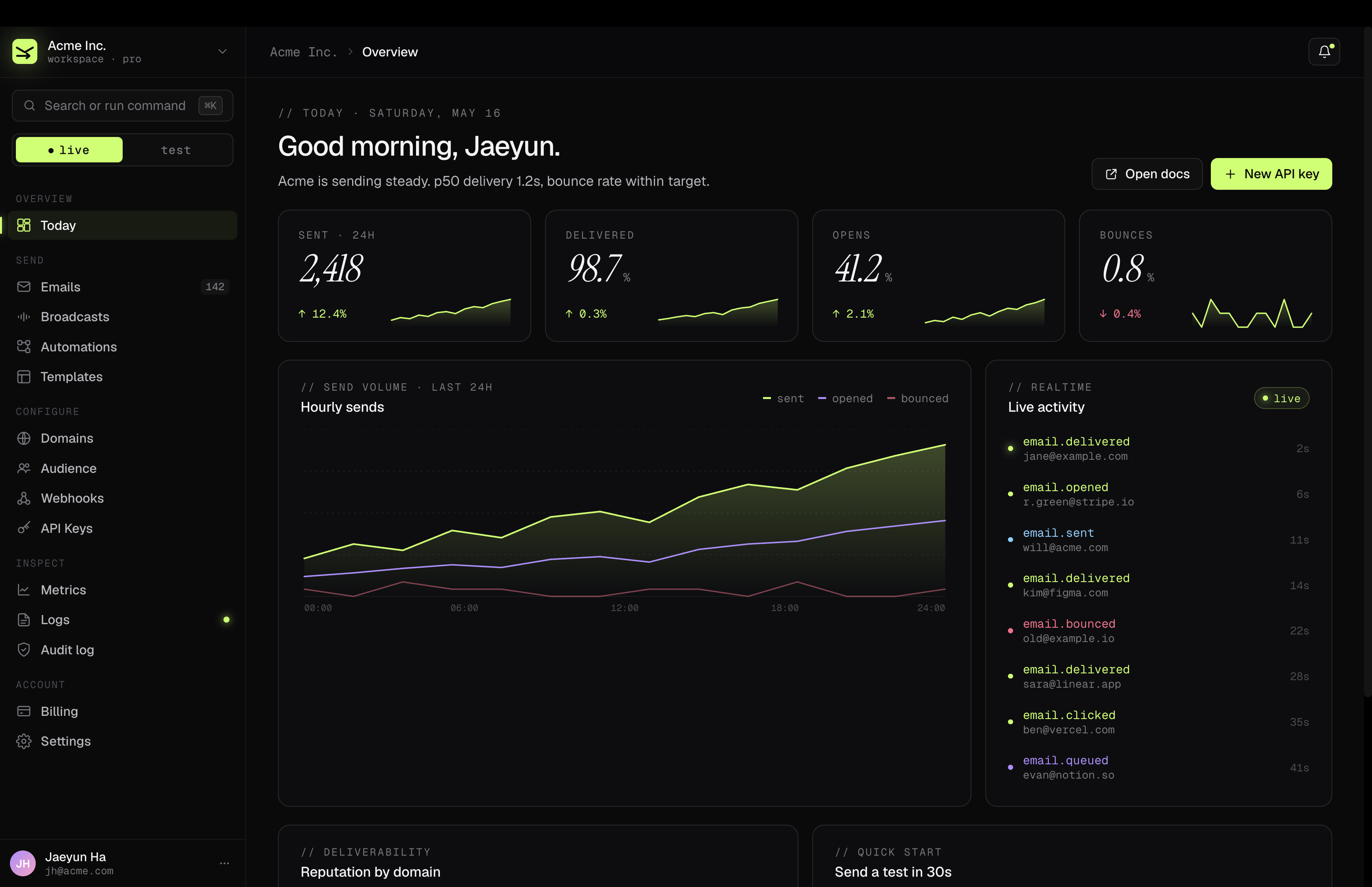
Opensend is a self-hostable email platform with the developer experience of Resend: REST APIs, SDKs, React email templates, domain verification, webhooks, broadcasts, automations, analytics, and an admin dashboard.
Use your OpenSend API key (os_...) with the Resend-compatible API surface.
Use Opensend when you want:
- Control — run email infrastructure on your own cloud and AWS SES quota.
- Compatibility — move Resend-shaped sends, audiences, and webhooks with minimal code changes.
- A real dashboard — manage domains, API keys, broadcasts, automations, templates, audiences, logs, and metrics.
- Open deployment — Docker Compose for local/self-hosted installs, with production guides for split app + ingester deployments.
Cloud or self-hosted
| Opensend Cloud | Self-host | |
|---|---|---|
| Where it runs | Managed at opensend.namuh.co | Your infrastructure |
| Fastest setup | Sign in with Google and add a domain | docker compose up -d |
| Cost model | Free tier, paid plans for hosted usage | Free software; you pay AWS SES/infrastructure |
| Best for | Teams that want zero ops | Teams that want full control |
Opensend Cloud is in early access. The Free tier needs no card; paid tiers are wired through Stripe.
Quick start
The fastest local path is Docker Compose:
git clone https://github.com/namuh-eng/opensend.git
cd opensend
cp .env.example .env

# Edit .env when you want Google login or real email sending.

docker compose up -d
Open http://localhost:3015.
Compose starts:
app— Next.js dashboard and public API on:3015postgres— local databasemigrate— one-shot schema migration runneringester— SES/SNS ingestion and workers on:3016scheduler— scheduled job trigger sidecar
For local development without the full app container:
cp .env.example .env
make setup    # starts Postgres, installs deps, pushes schema, seeds data
make dev      # http://localhost:3015
Agent setup
This repo is designed to be understandable to coding agents. Give the agent this checklist instead of making it infer the setup from random scripts:
1. Read the local instructions first
cat AGENTS.mdImportant defaults from AGENTS.md:
- TypeScript is strict; do not introduce
any. - Do not replace the existing Next.js, Playwright, Biome, Drizzle, or Docker setup.
- Run
make check && make testbefore committing code changes. - README images live in
docs/assets/; keep the landing copy in sync if an image is also used underpublic/landing/.
2. Use the expected branch and base
git fetch origin --prune
git checkout staging
git pull --ff-only origin staging
git checkout -b <type>/<short-description>
Open feature/fix/docs PRs against staging unless a maintainer explicitly asks for main.
3. Install and run locally
bun install
cp .env.example .env
make setup
make dev
Local ports:
| Service | Port | Command |
|---|---|---|
| Next.js app + API | 3015 | make dev or bun run dev |
| Bun/Hono ingester | 3016 | bun run start:ingester or Compose |
| Control-plane API skeleton | 3026 | bun run dev:api |
| Experimental Go ingester | 3027 | cd services/ingester-go && go run . |
4. Environment variables that matter first
Start from .env.example. For local UI work, Postgres plus auth URLs are enough. For real sends/domain flows, add AWS SES/S3, Cloudflare, and Google OAuth.
Minimum local values to check:
DATABASE_URL=postgresql://opensend:opensend@localhost:5432/opensend
BETTER_AUTH_URL=http://localhost:3015
NEXT_PUBLIC_APP_URL=http://localhost:3015
GOOGLE_CLIENT_ID=
GOOGLE_CLIENT_SECRET=
Google OAuth callback for local development:
http://localhost:3015/api/auth/callback/google5. Validate before pushing
Use the narrowest useful check while iterating, then run the full bar before the PR:
bun run check          # changed-file guardrail used by pre-push
make check             # full typecheck + Biome
make test              # Vitest
make test-e2e          # Playwright; requires the dev server on :3015
If you touch SDKs or service skeletons, also run their package-specific tests:
cd packages/go-sdk && go test ./...
ruby -I packages/ruby-sdk/lib packages/ruby-sdk/test/opensend_test.rb
bun run --cwd services/api test  # if tests exist for the touched API slice
6. Keep secrets out
Never commit .env, API keys, bearer tokens, database URLs with real passwords, OAuth secrets, Stripe secrets, Cloudflare tokens, or AWS credentials. Use placeholders in docs and screenshots.
Features
- REST API — send single or batch emails with API-key auth and idempotency keys.
- Resend-compatible surface — transactional sends, audiences/contacts, suppressions, and webhook semantics shaped for easy migration.
- SDKs — first-party TypeScript, Python, Go, and Ruby packages.
- React email templates — pass React components via the TypeScript SDK, or use registry-controlled dashboard starters with shared-renderer previews (see docs/react-email-templates.md).
- Domain verification — DKIM, SPF, DMARC, click tracking, and custom return paths, with Cloudflare automation.
- Broadcasts — block editor, slash commands, audience targeting, and review flow.
- Automations — multi-step workflows triggered by contact updates and custom events, executed by the ingester worker.
- Audience — contacts, segments, topics, custom properties, CSV import, and API routes.
- Suppressions — tenant-scoped bounce/complaint suppression handling.
- Inbound email — receive replies through
/api/emails/receiving. - Webhooks — HMAC-signed, Svix-compatible delivery for accepted/sent/delivered/opened/clicked/bounced/complained/delayed/failed events.
- Dashboard — dark-mode admin UI for email activity, domains, API keys, broadcasts, automations, templates, audience, metrics, logs, webhooks, and settings.
- Health checks —
/api/health, ingester/health, and service readiness endpoints.
API quickstart
Send an email with HTTP
curl -X POST http://localhost:3015/api/emails \
  -H "Authorization: Bearer $OPENSEND_API_KEY" \
  -H "Content-Type: application/json" \
  -d '{
    "from": "[email protected]",
    "to": ["[email protected]"],
    "subject": "Hello from Opensend",
    "html": "# It works!"
  }'
Open http://localhost:3015/docs for the local API reference.
TypeScript SDK
bun add opensendimport { Opensend } from "opensend";
const client = new Opensend(process.env.OPENSEND_API_KEY!, {
baseUrl: "https://your-deployment.example.com",
});
const { data } = await client.emails.send({
from: "[email protected]",
to: "[email protected]",
subject: "Hello from Opensend",
html: "# It works!",
});
console.log("Queued email", data?.id);Full docs: packages/sdk/README.md
Python SDK
python -m pip install ./packages/python-sdkimport os
import opensend
opensend.api_key = os.environ["OPENSEND_API_KEY"]
opensend.base_url = os.environ.get("OPENSEND_BASE_URL", "https://api.opensend.com")
email = opensend.Emails.send({
"from": "[email protected]",
"to": "[email protected]",
"subject": "Hello from Opensend",
"html": "# It works!",
})
print("Queued email", email["id"])Full docs: packages/python-sdk/README.md and docs/sdk/python.md
Go SDK
go get github.com/namuh-eng/opensend/packages/go-sdkpackage main
import (
"context"
"fmt"
"log"
"os"
opensend "github.com/namuh-eng/opensend/packages/go-sdk"
)
func main() {
client, err := opensend.NewClient(os.Getenv("OPENSEND_API_KEY"))
if err != nil {
log.Fatal(err)
}
email, err := client.Send(context.Background(), opensend.SendRequest{
From: "[email protected]",
To: []string{"[email protected]"},
Subject: "Hello from Opensend",
HTML: "# It works!",
})
if err != nil {
log.Fatal(err)
}
fmt.Println("Queued email", email.ID)
}Full docs: packages/go-sdk/README.md and docs/sdk/go.md
Ruby SDK
cd packages/ruby-sdk
gem build opensend.gemspec
gem install ./opensend-0.1.0.gemrequire "opensend"
OpenSend.api_key ENV.fetch("OPENSEND_API_KEY")
email = OpenSend::Emails.send(
from: "[email protected]",
to: "[email protected]",
subject: "Hello from Opensend",
html: "# It works!"
)
puts "Queued email #{email.fetch('id')}"Full docs: packages/ruby-sdk/README.md and docs/sdk/ruby.md
Self-hosting
Requirements
- Docker and Docker Compose
- AWS account with SES access for real email delivery
- Optional Cloudflare account for automatic DNS records
- Optional Redis/SQS/EventBridge for production-grade rate limiting and background jobs
Docker Compose
git clone https://github.com/namuh-eng/opensend.git
cd opensend
cp .env.example .env

# Set BETTER_AUTH_SECRET, Google OAuth if you want dashboard login,

# and AWS credentials when you want real sending.

docker compose up -d
The dashboard/API runs at http://localhost:3015. The ingester health endpoint is http://localhost:3016/health.
Production deployments
Read the deployment guides before shipping real traffic:
docs/self-hosting.md— env vars, database, SES, DNS, auth, reverse proxy, background jobs, Redis, upgrades, troubleshooting.docs/ingester-deploy.md— standalone ingester deployment, SNS cutover, replay runbook.docs/observability.md— logs, metrics, traces, and provider tracing.docs/hosted-stripe-cutover.md— hosted Stripe/paywall cutover checklist.
Production gotchas worth not learning the hard way:
- Run migrations before app code that expects new columns.
- Build Linux images for Linux deploys:
docker buildx build --platform linux/amd64 .... - Keep app and ingester as separate deployable services for production traffic.
- Point SES/SNS events at the ingester
/events/sesendpoint, not the Next.js app. - Inject secrets at runtime from a real secrets manager; do not bake them into images.
Architecture
Opensend is a Bun workspace monorepo. The Next.js app and production Hono ingester share a typed core package. Experimental service skeletons live alongside the current production path so migrations can happen incrementally.
src/                 # Next.js app and public API routes
├── app/             # App Router pages, dashboard, auth, docs, API
├── components/      # React UI
├── lib/             # auth, db, SES, S3, Cloudflare, cache, workers, events
└── middleware.ts    # API rate limiting

packages/
├── core/            # Shared DB client, repositories, DTOs, webhook helpers
├── ingester/        # Production Hono ingester and workers, port 3016
├── sdk/             # TypeScript SDK
├── python-sdk/      # Python SDK
├── go-sdk/          # Go SDK
└── ruby-sdk/        # Ruby SDK

services/
├── api/             # Bun + Hono control-plane API skeleton, port 3026
└── ingester-go/     # Experimental Go ingester skeleton, port 3027

tests/               # Vitest unit tests
tests/e2e/           # Playwright E2E tests
drizzle/             # Generated migration SQL
docs/                # Deployment, SDK, and operations docs
Tech stack
| Layer | Technology |
|---|---|
| Framework | Next.js 16, App Router, Turbopack |
| Runtime/package manager | Bun |
| Language | TypeScript strict mode |
| UI | Tailwind CSS, Radix UI, React 19 |
| Auth | Better Auth with Google OAuth and organizations |
| Database | PostgreSQL, Drizzle ORM |
| AWS SES v2 | |
| Storage | AWS S3 |
| DNS | Cloudflare API |
| Billing for hosted cloud | Stripe |
| Ingester | Hono on Bun |
| Background jobs | AWS SQS, EventBridge, scheduler sidecar |
| Cache/rate limit | Redis |
| Tests | Vitest, Playwright |
| Lint/format | Biome |
Development commands
make setup       # first-time local setup
make dev         # app on http://localhost:3015
make check       # full typecheck + lint
make test        # Vitest
make test-e2e    # Playwright, requires dev server
make all         # check + test
make fix         # Biome autofix
Useful package commands:
bun run dev:api              # control-plane API skeleton on :3026
bun run start:ingester       # production ingester locally on :3016
cd services/ingester-go && go test ./...
cd packages/go-sdk && go test ./...
ruby -I packages/ruby-sdk/lib packages/ruby-sdk/test/opensend_test.rb
Roadmap
- [x] Webhook signature verification with Svix-compatible HMAC headers
- [x] Email scheduling with EventBridge/SQS-backed scans
- [x] Team support with multi-tenant auth and organization invites
- [x] Built-in open/click analytics
- [x] Additional webhook event types: opened, clicked, complained, delivery delayed
- [x] Resend-compatible audiences/contact slices
- [ ] SMTP relay support without AWS SES
Contributing
Contributions are welcome. Read CONTRIBUTING.md, branch from staging, keep changes narrow, and include validation evidence in the PR.
License
Elastic License 2.0 — free to use, modify, and self-host. The restriction: you cannot offer Opensend itself as a hosted email service to third parties.